Valencia City Water District · DocuManage
Archived Documents
Resume: §5 Restore · §6 Archive vs retention1. Purpose
Archived Documents lists records that were archived (soft-deleted) in DocuManage. They are removed from normal search and dashboard counts but not permanently deleted — files and metadata remain for audit, retention review, or recovery.
Use this page to review what has been archived and coordinate with Retention Schedule when disposition policy applies.
2. How to open
- Sign in with a role that can access document control.
- Sidebar → Document Control → Archived Documents.
- Or from Retention Schedule, use related links / sidebar.
URL: /retention/archived
3. Screen layout
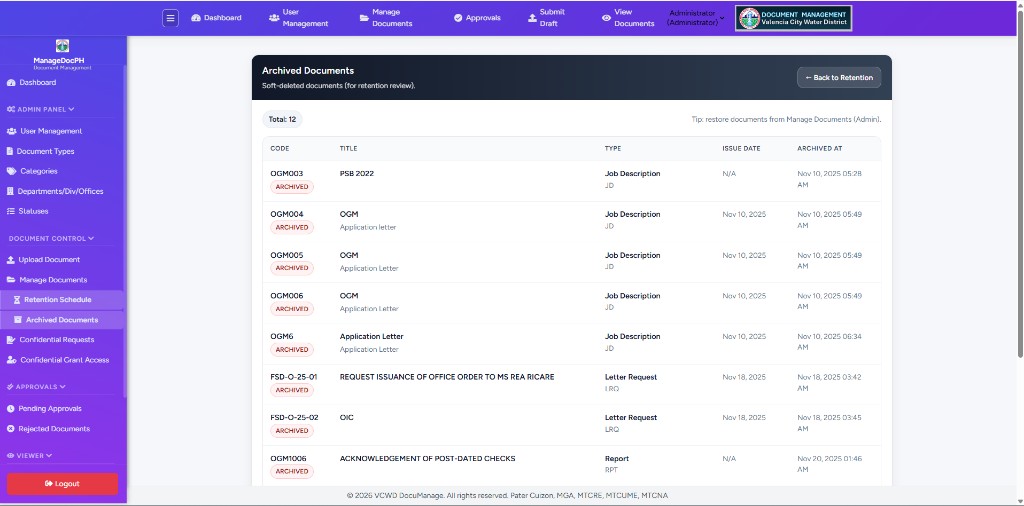
| Area | Description |
|---|---|
| Header | Archived Documents — Soft-deleted documents (for retention review). |
| ← Back to Retention | Returns to Document Retention Dashboard |
| Total | Count of archived records in the list |
| Tip | Restore documents from Manage Documents (Admin). |
| Table | All archived rows — see §4 |
4. Document table
| Column | Description |
|---|---|
| Code | Document code with red ARCHIVED badge |
| Title | Document title (short description may appear below) |
| Type | Document type name and code (e.g. Job Description JD) |
| Issue Date | Issue date on record, or N/A if not set |
| Archived At | Date and time the document was archived (soft-deleted) |
This page is a read-only review list. There is no Restore button here — restore from Manage Documents (Administrator).
5. Restore a document (Administrator)
To bring an archived document back to active lists:
- Note the Code from Archived Documents (or search in Manage Documents admin view).
- Open Manage Documents as Administrator (admin view includes archived rows).
- Find the row with the ARCHIVED badge.
- Click gray Restore in Actions and confirm the dialog.
- The document returns to normal lists; Dashboard and Retention Schedule will include it again when applicable.
See Manage Documents §8.3 Archive for archive and restore confirmation messages.
6. Archive vs retention
| Concept | Meaning in DocuManage |
|---|---|
| Archive (soft delete) | Manual action — Archive on Manage Documents or Edit. Record appears here. |
| Retention expiry | Time-based rule from Document Type + Issue Date — see Retention Schedule |
Office policy may require archiving after retention review, or archiving for other reasons before expiry. Both workflows can be used together.
7. Roles
| Role | Typical access |
|---|---|
| Administrator | View archived list; restore from Manage Documents |
| Document Controller | View for retention / records review |
| Contributor | View per department visibility rules |
Related documentation
- 09 — Manage Documents (Archive, Restore)
- 10 — Retention Schedule
- Documentation index