Valencia City Water District · DocuManage
Activity Log
Resume: §3 Screen · §5 Log table
Quick start: Sidebar Admin Panel → Activity Log, or Dashboard dark Activity Log KPI card.
URL:
/activity-log
Admin-only /activity-log
1. Purpose
The Activity Log is a searchable audit trail of document actions: created, updated, viewed, moved, received, archived, confidential access, approvals, and more — for documents the administrator can access.
Dashboard vs full log
- Toast notifications on the dashboard show recent activity briefly.
- Activity Log (this module) is the complete, filterable history.
- Under Admin Panel → Settings: Manual Usage Tracker logs public manual visits (IP + module) — separate from document activity.
2. How to open
- Sidebar → Admin Panel → Activity Log (clipboard icon)
- Dashboard → dark Activity Log KPI card (last card in the row)
- Direct URL:
/activity-log
3. Screen overview
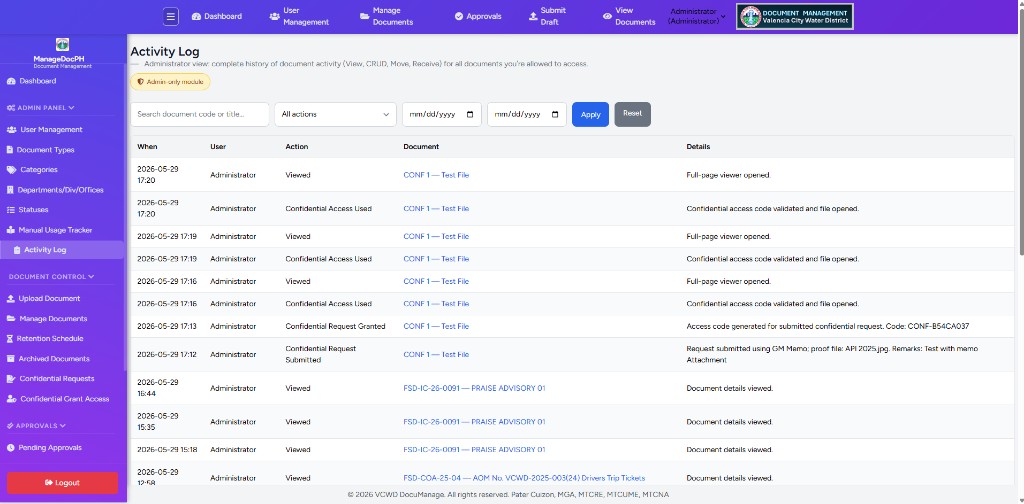
| On screen | Description |
|---|---|
| Indigo header card | Title Activity Log, subtitle (View, CRUD, Move, Receive, Confidential), ← Back to Dashboard |
| Total (indigo pill) | Full count of log entries matching filters (e.g. Total: 39853) |
| Admin-only (yellow pill) | Only Administrator role can open this page |
| Filter panel | Grey box: search, All actions, dates, Apply / Reset — §4 |
| Log table | Indigo column headers; action names in indigo badges — §5 |
| Sidebar | Admin Panel (expanded) → Activity Log highlighted; Settings subgroup for Manual Usage Tracker |
4. Filters
| Control | Use |
|---|---|
| Search | Document code or title (partial match) |
| All actions | Dropdown — one type (Created, Updated, Viewed, Moved, Confidential Request Submitted, …) or all |
| From / To | Date range (mm/dd/yyyy) |
| Apply (indigo) | Run filters; keeps criteria in the URL |
| Reset (grey) | Clear all filters |
5. Log table
| Column | Contents |
|---|---|
| When | Date and time (Y-m-d H:i) |
| User | Who performed the action (e.g. Administrator) |
| Action | Event type in an indigo pill — e.g. Viewed, Confidential Access Used, Confidential Request Granted |
| Document | Code and title as a link (e.g. CONF 1 — Test File) when the document still exists |
| Details | Extra text (e.g. Full-page viewer opened, access code notes) |
Pagination appears at the bottom when there are many rows (25 per page).
6. Use cases
- Investigate who approved, moved, archived, or viewed a document
- Compliance and internal audit trails
- Troubleshoot unexpected status or metadata changes
- Verify confidential request, grant, and access-code usage
- Correlate with Document Movements for physical transfers